S3-Compatible Object Storage is evolving
S3-compatible object storage has evolved from low-cost cold storage to a next generation platform designed to meet the evolving needs of organizations managing massive volumes of unstructured data. Products like Dell ObjectScale, Dell Elastic Content Storage, IBM iCOS, NetApp StorageGrid, Hitachi HCP, Scality Ring and Minio Alstor are now being used as primary storage in more use cases. In addition, there are a number of S3 compatible cloud providers including: AWS, Wasabi and Oracle. As a result, the data needs to be backed up and protected just like any other primary storage. The 3-2-1 Backup Rule is designed to ensure data safety by diversifying your data across different locations and storage types to protect against various threats like hardware failure, human error, and natural disasters. Why this is important:
- Diversification: By spreading your data across different locations and media, you reduce vulnerability to a single point of failure.
- Protection against threats: The 3-2-1 rule helps protect against scenarios like hardware failure, accidental deletion, ransomware, and natural disasters like fires, earthquakes or hurricanes. floods.
- Data integrity:
It provides a robust safety net, ensuring you have a way to recover your data even if your primary system and one backup are compromised.
Why You Can’t Easily List “New Files” in S3
S3 compatible object storage systems are designed for massive scalability and simplicity, but that comes with trade-offs:
- Stateless operations: S3 APIs are designed to be stateless and simple. This makes them highly scalable but limits features like incremental change tracking.
- Flat Namespace, No File System Semantics: S3 stores objects in a flat namespace within buckets. There’s no concept of folders or file system metadata.
- No Built-in Change Log or Index: S3 doesn’t maintain a native index of recently added or modified objects. To find new files, you must list “all objects” and compare timestamps or versions — which can be slow and expensive for large buckets.
- Eventual Consistency (in some systems): Some S3-compatible systems offer eventual consistency for listing operations, meaning newly added objects might not appear immediately in a list. This makes real-time change tracking unreliable without application add-ons or external tooling.
Due to these limitations determining new, modified or deleted items is computationally expensive and time consuming. In use cases like backup, large object stores with more that 200 million objects may take more than 24 hours to process. Most organizations would find this situation unacceptable.
Some S3 object storage systems, like Dell ECS do utilize internal event notifications to help with the new object tracking that can be passed to an external tool for processing. However, there are a number of hard “requirements” in order to use this capability and they include:
- ECS version 3.8.0.1 or newer is installed
- Copy-to-Cloud must be enabled at bucket creation time
- Metadata Search must be enabled at bucket creation time
- All ECS access nodes require a minimum of 172GB of RAM
Load Balancers are Required to enable Scalable S3 Performance
The ability to scale performance independent of capacity is a key selling point for S3 object storage. To increase the aggregate throughput more “access nodes” are added to the S3 object storage system along with a Load Balancer to evenly distribute the traffic.

A New Approach – leveraging the Load Balancer
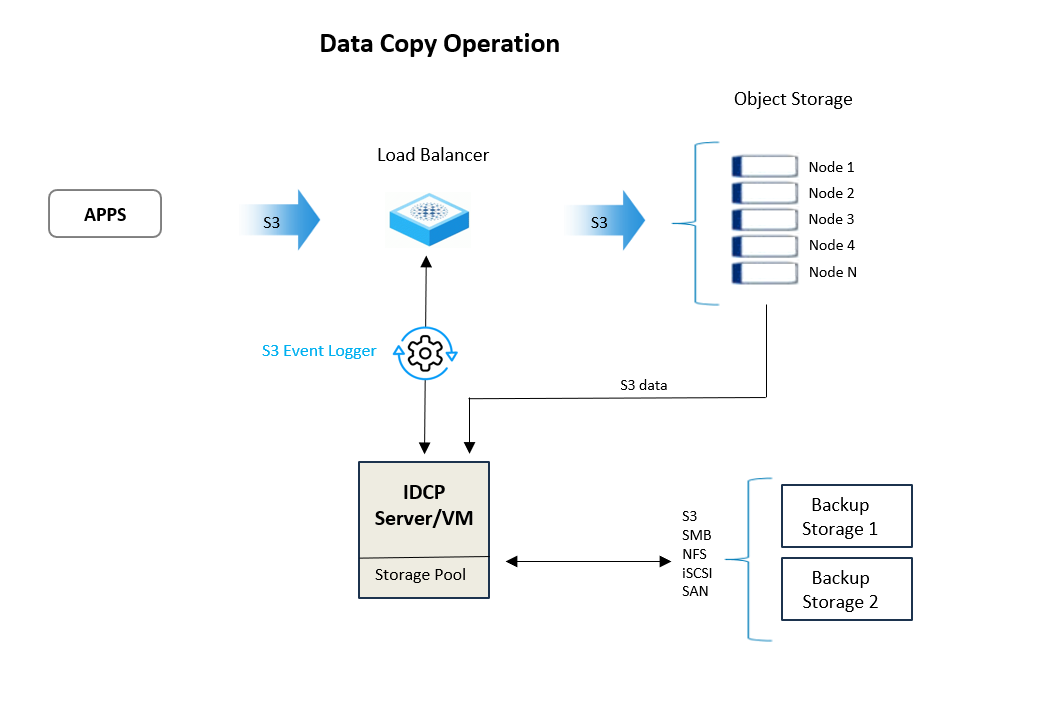
Introducing our new patent pending Incremental Data Copy Protection (IDCP) for S3 Storage with read-though Access during recovery. IDCP is designed for S3 compatible object storage systems and cloud S3 storage. Innovative technology determines new and changed data by using a S3 Event logger to capture the S3 API protocol traffic as it passes through a network switch on the way to the target S3 Storage. This communication data is sent to the IDCP server where a delta analysis finds all new or modified data or meta data that needs protection. The delta analysis can run continuously providing a minimal Recovery Point Objective and Recovery Time Objectives measured in minutes.
Incremental Data Copy Protection for S3 Storage
Key Features:
The Incremental Backup Software is built upon the framework of our existing Recovery and Backup software for CAS. Below are the key features:
- Incremental S3 backup: Fast, low stress incremental backup
- Read-Through Access during recovery: Read access during recovery process
- Isolated: Data is backed up to another system outside of the object storage system
- Low RTO and RPO: Continuous backups provide low RTO and RPO providing better protection that scheduled backup applications.
- Prioritized Recovery: Flexible recovery options include: a single object, a list of objects, a date range or entire bucket.
- Supports existing S3 object storage: Works with exiting buckets by taking baseline inventory and backup and then running incremental backups.
- Load Balancer: Multiple deployment options including: standalone, active-passive HA pair, active-active HA pair.
- Storage Pools: Multiple storage devices can be added to a storage pool, so if one is unavailable or full the backup just writes to the next available one.
- Reports: Large number of Reports available including a list of objects in the backup queue, back up status and statistics.
Read Through Access during Recovery
Eliminating down time by providing read access to data after the primary storage system has failed is critical for organizations operating in time sensitive industries like healthcare, finance, transportation or government. Traditional backup applications require a complete restore before data is accessible and this can take days or weeks depending upon the size of the system. Resulting in loss of productivity and brand reputation along with possible fines from Regulatory Agencies.
Read-Though Access to the protected data in the continuity store while a recovery is being performed is the second key innovation as it allows clients read access to their data in seconds. This process occurs with a single administrative mouse click and is transparent to users and applications. The IDCP server switches modes from data protection to data recovery. The IDCP stops existing processes including ingesting S3 event logs and delta determination and automatically reconfigures its operations.
1)Change the endpoint configuration of the Switch IDCP S3 Service Interface.
2)Change the Service Interface to block all write S3 traffic and only allow read traffic.
3)Expose the Endpoint/mountpoint and virtual file/object system
4)Active the Service Interface to only respond to S3 read
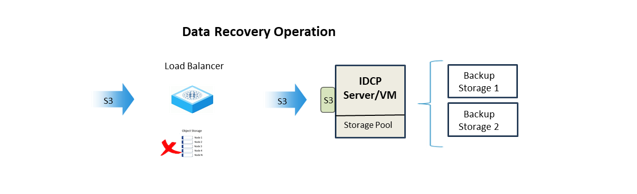
Flexible recovery options include: a single object, a list of objects, a date range or entire bucket. This enables your system administrators to prioritize a recovery process if needed. Progress can be monitored in the User Interface. Once all data is recovered the IDCP server can undo all the changes to resume normal data copy processes.
Data Copy Operation
In normal operations the IDCP server receives Protocol traffic and ingests incremental data. This is a one-way process providing obscurity for the IDCP server on the network. The delta analysis starts by processing the protocol traffic data into a useful format, retaining only what is necessary for operations. Then an analysis identifies the S3 keys of the incremental data, so objects can be read and staged on the IDCP. Then the copy protection process packages the incremental data and performs bucket level policy operations such as compression, encryption, and containerization. Then it writes the data to a storage pool consisting of one or two remote storage systems referred to as the continuity store. A verification process using SHA-256 hashes confirms the data was successfully stored on the remote storage. Finally, the virtual S3 object storage interface is updated.
High Availability Options

A wide variety of deployment options are available for existing environments including those with High Availability needs. Our Pre-Sales Engineers can help you define the model that fits your particular needs.